
Engineering
Reversing Authentication
Zero-Cost WhatsApp Authentication for Learnzy
Engineering Case Study • Authentication Infrastructure
Built while developing Learnzy.
| Project Type | Engineering Case Study |
| Category | Authentication Infrastructure |
| Built For | Learnzy |
| Author | Himanshu Gupta |
| Status | Production |
| Part of | LearnzyLabs |
Executive Summary
While building Learnzy, authentication initially relied on Google OAuth through Supabase. Although technically reliable, it created an unexpected product problem: I had no verified communication channel with my users.
Students frequently sent valuable feedback through WhatsApp, but because they authenticated using Google, I couldn’t proactively reach out to users, collect structured feedback, or build long-term communication.
The obvious solution was mobile number authentication.
The obvious implementation was SMS OTP.
I rejected that solution.
Instead of optimizing OTP costs, I questioned whether OTP needed to exist in its traditional form at all.
The result was a WhatsApp-based authentication flow that eliminated recurring SMS costs while simultaneously establishing a verified communication channel between Learnzy and every authenticated student.
Context
At the time Learnzy was using:
flowchart TD
  A[Android App] --> B[Google OAuth]
  B --> C[Supabase Authentication]
This worked well.
Students could log in within seconds.
Authentication itself was never the problem.
The problem appeared after authentication.
Students regularly messaged me personally on WhatsApp with feature requests, bug reports, and study experiences.
Those conversations became one of the most valuable product feedback loops.
However, Google authentication never exposed a verified mobile number that could later be used to continue those conversations.
The product had users.
The product did not have a communication channel.
The Problem
I wanted users to authenticate using their mobile numbers.
Not because authentication was failing.
Because communication was.
However, every existing solution introduced recurring infrastructure costs.
Typical authentication looked like this:
flowchart TD
  A[User] --> B[Enter Phone Number]
  B --> C[Backend]
  C --> D[SMS Provider]
  D --> E[OTP]
  E --> F[User enters OTP]
  F --> G[Authenticated]
Problems:
- Every login generates an SMS cost.
- Requires third-party OTP infrastructure.
- User manually types phone number.
- User manually types OTP.
- Creates another infrastructure dependency.
At an early stage, recurring costs matter.
I wanted a better solution.
Design Constraints
Before designing the system I wrote down the constraints.
Functional Constraints
- Must uniquely verify every user.
- Must keep verification safe against repeated or stale attempts.
- Must integrate with Supabase Authentication.
- Must work on Android.
Product Constraints
- Authentication should remain simple.
- Students should not type unnecessary information.
- Must establish a communication channel after signup.
Business Constraints
Most important constraint:
Authentication should introduce zero recurring verification cost.
I treated this as a hard constraint.
Not a preference.
Existing Solutions Considered
Option 1: Traditional SMS OTP
Advantages:
- Standard
- Familiar
- Reliable
Rejected because:
- Fixed recurring cost
- Requires SMS provider
- Doesn’t satisfy business constraint
Option 2: Google Authentication
Advantages:
- Easy onboarding
Rejected because:
- No verified mobile number
- Poor communication channel
- Feedback loop remains broken
Option 3: WhatsApp Business Outbound Message
Advantages:
- Uses WhatsApp
Rejected because:
- Still incurs outbound messaging costs
- Doesn’t solve the core constraint
Whiteboard Thinking
Instead of asking:
How do I make OTP cheaper?
I asked:
Why does authentication require the server to send the first message?
That completely changed the design.
Known Facts
- Every student already has WhatsApp.
- Inbound WhatsApp messages are significantly cheaper than traditional outbound verification flows.
- WhatsApp supports deep links.
- Messages can be pre-filled.
- Every authentication attempt can carry a short-lived verification payload.
- Webhooks receive incoming messages instantly.
Looking at these facts individually didn’t help.
Looking at them together revealed a different architecture.
The Insight
Traditional authentication is server initiated.
What if authentication became user initiated instead?
Instead of:
flowchart TD
  A[Server] --> B[Send OTP]
  B --> C[User]
Reverse it.
flowchart TD
  A[User] --> B[Send Verification]
  B --> C[Server]
The authentication direction changes completely.
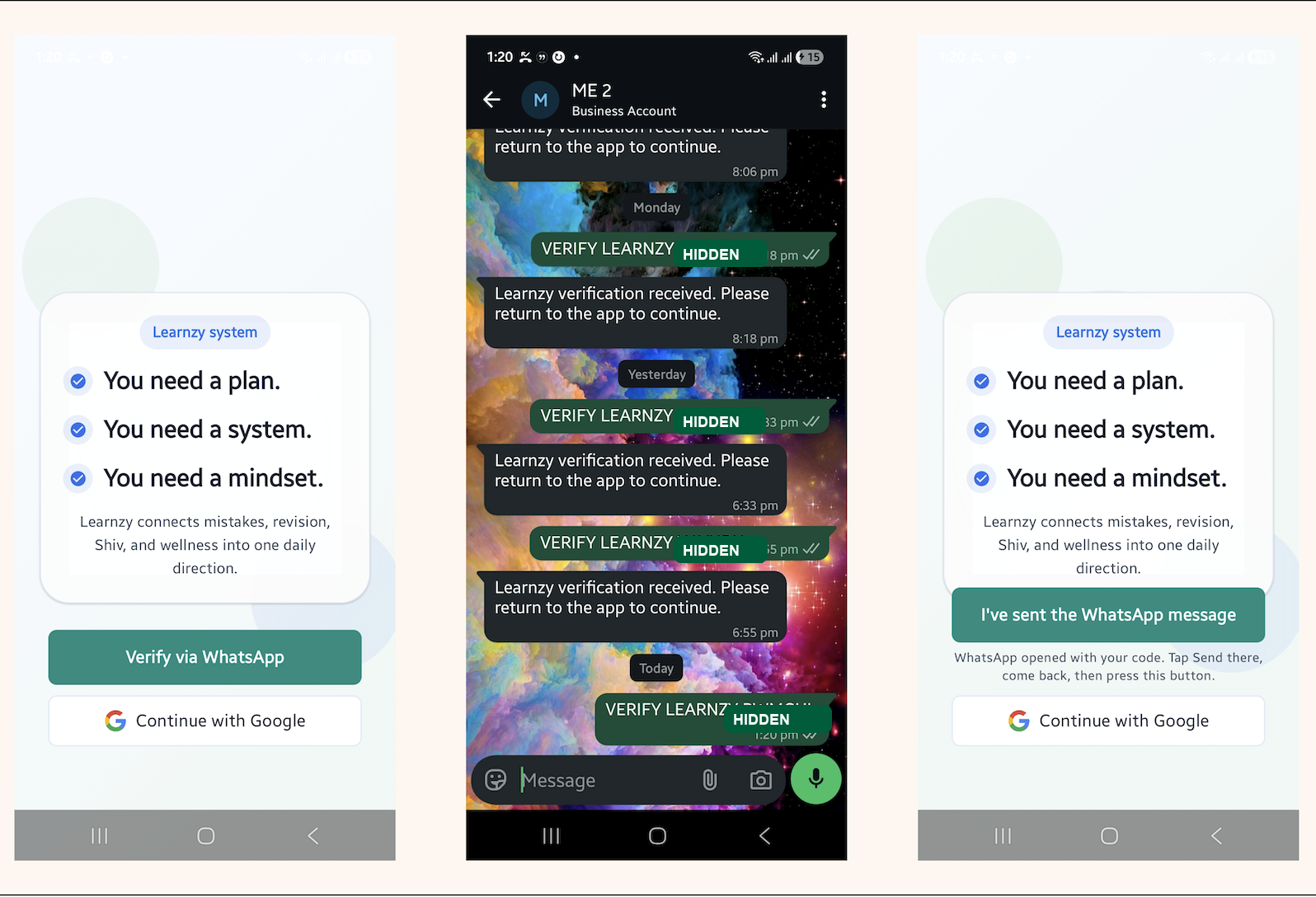
Final Architecture
flowchart TD
  A[Learnzy Android App] --> B[Prepare Verification Payload]
  B --> C[Open WhatsApp Deep Link Automatically]
  C --> D[Pre-filled Verification Message]
  D --> E[User taps Send]
  E --> F[WhatsApp Business Number]
  F --> G[Incoming Webhook]
  G --> H[Supabase Edge Function]
  H --> I[Verify Incoming Message]
  I --> J[Complete App Login]
  J --> K[User Logged Into Learnzy]
Sequence Diagram
sequenceDiagram
  participant User
  participant App as Learnzy App
  participant WA as WhatsApp
  participant Webhook
  participant Edge as Supabase Edge Function

  User->>App: Tap Login
  App->>App: Prepare Verification Payload
  App->>WA: Open WhatsApp
  User->>WA: Send Message
  WA->>Webhook: Webhook Triggered
  Webhook->>Edge: Forward Verification Message
  Edge->>Edge: Verify Incoming Message
  Edge->>App: Complete Login
  App->>User: Authenticated
Authentication Flow
Step 1
The application prepares a short-lived verification payload for the login attempt.
Step 2
The app opens WhatsApp using a deep link.
The user never manually enters:
- phone number
- verification code
Everything is already prepared.
Step 3
The user presses Send.
The message reaches Learnzy’s WhatsApp Business account.
Step 4
A webhook immediately receives the message.
The backend receives the relevant verification information:
- sender phone number
- verification payload
Step 5
The incoming message is checked against the login attempt.
If valid:
- phone number becomes verified
- app login is completed
- login succeeds
Comparison
| Traditional OTP | Learnzy Authentication |
|---|---|
| SMS Required | WhatsApp Required |
| Server initiates verification | User initiates verification |
| Outbound message | Inbound message |
| Recurring SMS cost | No SMS infrastructure cost |
| User types phone number | One tap |
| User types OTP | Automatic verification |
| Separate support channel | Authentication doubles as communication channel |
Engineering Decisions
Decision 1
Do not use SMS.
Reason:
Recurring infrastructure costs.
Decision 2
Do not ask users to manually enter their phone number.
Reason:
Reduce friction.
Decision 3
Use WhatsApp Deep Links.
Reason:
Already installed on almost every student’s phone.
Decision 4
Generate a verification payload per authentication attempt.
Reason:
Identify the login attempt without asking the user to type a code.
Decision 5
Authenticate through inbound webhooks.
Reason:
Reverse the traditional authentication flow while avoiding outbound verification messages.
Trade-offs
Advantages
- Zero SMS provider dependency.
- Minimal user interaction.
- Verified communication channel established automatically.
- Simple user experience.
- Lower infrastructure complexity.
Limitations
- Requires WhatsApp installation.
- Depends on WhatsApp Business API.
- Less conventional than SMS authentication.
- Not appropriate for products targeting users without WhatsApp.
What I Learned
This project fundamentally changed how I think about engineering.
Initially, I was trying to optimize an existing solution.
The better approach was questioning the assumption behind it.
The assumption was:
Authentication requires the server to send the first message.
Removing that assumption led to an entirely different architecture.
I’ve since found this pattern useful across many projects:
Rather than asking:
How can I improve this implementation?
I now ask:
What assumption is this implementation built on?
Often, removing that assumption reveals a much simpler system.
Future Direction
Potential future work includes:
- Multi-device authentication
- More explicit device/session policies
- Automatic device recognition
- Enterprise WhatsApp support
- Passkey integration
- Multi-factor authentication support
Project Outcome
This authentication system has been deployed inside Learnzy as a production authentication mechanism.
More importantly, it demonstrates a broader engineering principle that appears repeatedly across LearnzyLabs projects:
The best solution isn’t always a better implementation of the existing approach. Sometimes it’s questioning whether the approach itself is necessary.